How to make phone calls from Cline with an MCP server
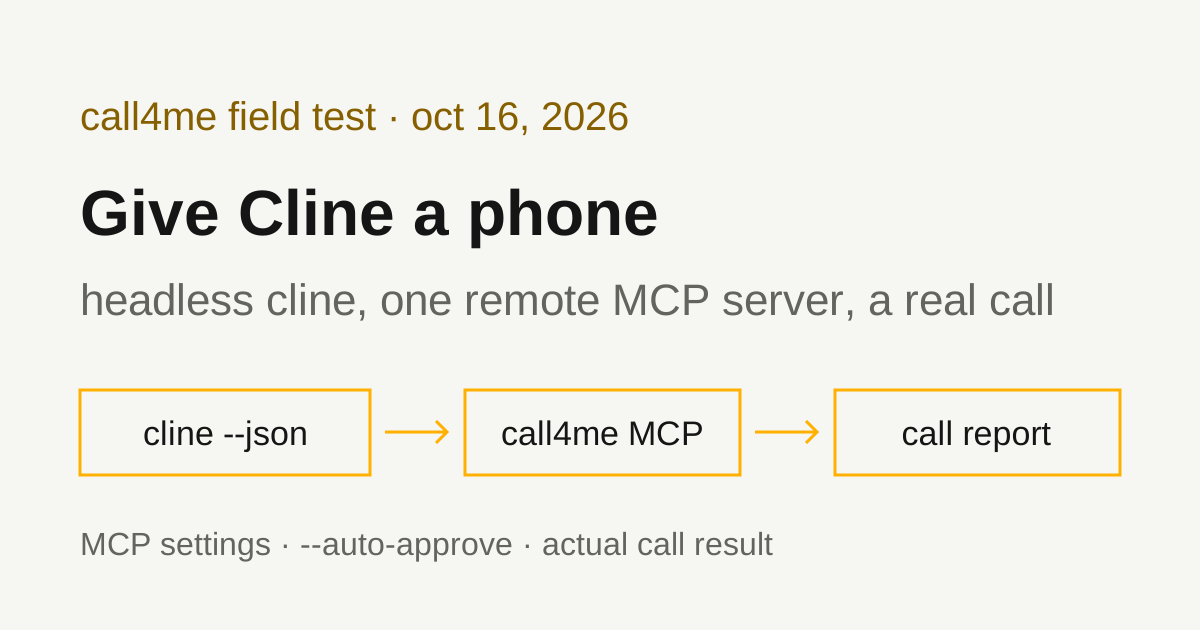
We gave the Cline CLI call4me as a remote MCP server, ran it headless, and had it call UPS customer service. Here is the setup that keeps the API key out of Cline's settings, the two things that stop a headless run partway through a call, and what the call actually got.
 Nick Khami / / 14 min read
Cline can make phone calls through an MCP server. The Cline CLI connects to remote MCP servers over Streamable HTTP, so you add call4me, give a headless cline run a brief with a goal and clear limits, and it places the call, follows it and reports what happened. A voice caller handles the conversation. Cline reads the status and transcript through tools.
We verified this with Cline CLI 3.0.72 on October 16, 2026, on Linux, with OpenAI's gpt-5.1 as the model. Cline placed one real call to UPS customer service at 1-800-742-5877 from a written brief. A live representative answered 17 minutes 12 seconds after UPS picked up, most of it on hold, and answered all four questions.
It took three headless runs to follow that one call to the end. Cline stops a run after five identical tool calls in a row, and checking a call's status every 50 seconds is exactly that. The fix is one line in the brief, covered below.
Install the Cline CLI
You need an API key for a model provider Cline supports, a call4me account, and calling credits for the phone part.
Cline's CLI overview installs it from npm:
npm i -g cline
That installed 3.0.72. Check it with cline --version. The package ships a prebuilt binary for your platform, and it keeps its settings and state in ~/.cline (--config and --data-dir move them, per the CLI reference). We ran every test with a throwaway HOME, so none of this touched a real Cline setup.
Pick a model without the setup wizard
cline auth walks you through choosing a provider, and the CLI reference shows a non-interactive form, cline auth -p <provider> -k <key> -m <model>. That saves the key in Cline's provider settings.
For a scripted run, we skipped cline auth and passed the provider and model as flags, with the key in the environment:
export OPENAI_API_KEY=...
cline -P openai-native -m gpt-5.1 --json "Reply with the single word ready. Do not use any tools."
The docs don't list provider IDs. openai-native is OpenAI's ID in the 3.0.72 provider catalog, which also lists OPENAI_API_KEY as the variable it reads. The run answered "ready", and afterward the key wasn't in any file under ~/.cline. Cline did save openai-native and gpt-5.1 as the last used provider and model.
Add call4me as a remote MCP server
The CLI reads MCP servers from ~/.cline/data/settings/cline_mcp_settings.json, and CLINE_MCP_SETTINGS_PATH points it at a different file. Cline's remote server guide shows this shape for a Streamable HTTP server:
{
  "mcpServers": {
    "call4me": {
      "type": "streamableHttp",
      "url": "https://call4.me/mcp",
      "timeout": 120,
      "headers": {
        "Authorization": "Bearer YOUR_CALL4ME_API_KEY"
      }
    }
  }
}
The guide warns that leaving out type falls back to the older SSE transport, so keep it. timeout is per server, in seconds; the 3.0.72 source sets the default at 60 and caps it at 3600. We set 120 so a status check that waits 50 seconds has room to spare.
Cline won't fill the key in from an environment variable. We read the 3.0.72 settings schema: headers is a plain map of strings, passed to the HTTP client as written. There's no ${VAR} substitution, unlike Goose or Cursor. cline mcp add writes the same thing. We ran this with a dummy token:
cline mcp add call4me https://call4.me/mcp --transport http --header "Authorization: Bearer DUMMYTOKEN" --yes
It saved the header into the settings file as typed. So if you add call4me the documented way, the settings file holds your key.
Keep the key out of Cline's settings
What we ran instead: keep the key in an environment variable, and write the MCP settings to a private temporary file for each run, deleting it when the run ends. Copy your key from the account page and read it in without echoing it:
read -rsp 'call4me API key: ' CALL4ME_API_KEY
printf '\n'
export CALL4ME_API_KEY
Then save this as cline-call.sh:
#!/usr/bin/env bash
# Run Cline with call4me available for this run only.
set -euo pipefail
: "${CALL4ME_API_KEY:?export CALL4ME_API_KEY first}"
settings="$(mktemp)"
trap 'rm -f "$settings"' EXIT
printf '{"mcpServers":{"call4me":{"type":"streamableHttp","url":"https://call4.me/mcp","timeout":120,"headers":{"Authorization":"Bearer %s"}}}}\n' \
  "$CALL4ME_API_KEY" > "$settings"
CLINE_SESSION_BACKEND_MODE=local CLINE_MCP_SETTINGS_PATH="$settings" \
  cline -P openai-native -m gpt-5.1 --json "$@"
mktemp creates the file readable only by you, and the trap deletes it when the script exits. We checked after our runs: the key wasn't in any file under Cline's config, data or log folders, and the temporary file was gone.
CLINE_SESSION_BACKEND_MODE=local matters here. By default, the CLI runs sessions in a background "hub" process that it starts on first use and leaves running. That process keeps the environment from the run that started it. In our first test, a later run pointed CLINE_MCP_SETTINGS_PATH at a new file, and the hub was still using the old one. The CLI reference lists CLINE_SESSION_BACKEND_MODE with the values local, hub, remote and auto. With local, our runs started no hub process and used the file each run named.
Two things that didn't work: a shell process substitution, <(...), as the settings path (Cline loaded no call4me tools), and --id to continue a saved session in --json mode (it exited with "JSON output mode requires a prompt argument or piped stdin").
Check the connection before dialing
We ran:
./cline-call.sh "Use the call4me_get_balance tool to check my phone calling connection. Show my balance and call4me numbers. Do not place a call."
Cline called call4me__call4me_get_balance once and showed the balance and the account's call4me numbers. Cline names MCP tools as server name, two underscores, tool name, so the tool shows up in the output with a call4me__ prefix. You can still refer to it as call4me_get_balance in a prompt; ours did.
--json prints one JSON object per line. The final answer is the text of the run_result line, which the CLI overview pulls out with jq -r 'select(.type == "run_result") | .text'.
Sign in with OAuth instead (documented, not tested by us)
call4me's MCP server also supports browser OAuth sign in. The remote server guide says the cline mcp menu has an Authorize OAuth action for remote servers. We used the header for every run on this page and did not test OAuth in Cline. In the 3.0.72 source, OAuth state is saved in the same MCP settings file under the server's entry.
Tool permissions in headless runs
A prompt on the command line starts in act mode with auto-approve on. The CLI help puts it this way: "Default to start in act mode with auto-approve enabled." --auto-approve <boolean> sets it for all tools. That's why our runs placed the call with no approval step.
We tried --auto-approve false with the same balance check. Cline picked call4me__call4me_get_balance, and the tool result came back as an error:
Tool approval requires an interactive session, but this session is non-interactive.
The model then told us it couldn't get the balance. The run still finished as completed, so check the tool results if you script it.
So a headless run is all or nothing: auto-approve, where Cline can place calls without asking, or an interactive session (cline or cline -i), where you approve as you go. Auto-approve also covers Cline's own tools, including shell commands and file edits. The CLI overview warns that autonomous runs "can modify files and run commands without further prompts". We ran from an empty folder and said in the brief not to run shell commands or edit files.
With auto-approve, the brief is your guardrail. Say who to call, what may be shared, and "do not place any other call."
Give Cline a bounded calling task
The brief should say who to call, why, what to ask, what the caller may share, and when to stop. This is the prompt we used for UPS, with our callback number removed:
Use call4me to make one informational phone call to UPS customer service at 1-800-742-5877 (the number listed on ups.com/us/en/support/contact-us).
This is research for a consumer guide on reaching UPS customer service. It is a general inquiry, not about any package, shipment or account.
Questions for the representative:
- If someone calls this number, what's the fastest way to reach a live person?
- Does UPS offer a callback instead of holding?
- If tracking says a package was delivered but it isn't there, what should the person do, and how long should they wait before filing a claim?
- What should a caller have ready before calling?
Limits: category "general" with these questions in details.questions, max_minutes 240, timezone America/Los_Angeles. The caller must say it is a general inquiry for a consumer guide, never claim to be a customer, never give a tracking number, account, address, phone number on an account, card or personal details, and never agree to any change or purchase. If the automated system offers to text a link or send a verification text or email, decline every time, say it is a general question, and ask for a representative. Decline any callback and stay on hold. The only callback number it may give is [your callback number] (put that in facts).
After placing it, follow the call with call4me_get_call (wait_seconds 50) until it ends. If an open question appears, answer only from this brief; otherwise say it is unknown. If placing the call returns a concurrency or limit error, wait 3 minutes and try again; if any tool call times out, check with call4me_list_calls or call4me_get_call before placing again, and never place a duplicate. Then report the call ID, whether a live person was reached, how long it took to reach them, and the answers to each question. Do not place any other call. Do not run shell commands or edit files.
We passed it as the prompt to the wrapper:
./cline-call.sh "$(cat ups-prompt.txt)"
max_minutes 240 lets the call wait on a long hold; it caps billed time and only holds credits for that cap. wait_seconds 50, the maximum, makes each status check cover more time. -t sets a run timeout, and the default of 0 means none.
That brief has one problem with Cline, the wait_seconds 50 line. Here's why, and the line to use instead.
Follow a long call without tripping the loop guard
Cline placed the call, then checked it with call4me_get_call four times while UPS's menus and hold music played. The fifth check, the same tool with the same arguments, came back as an error in under a second, and the run ended as aborted. The call itself kept going. Ending the run doesn't hang up.
We started a second headless run to follow the same call ID, with no new call. It stopped at its fifth check too, and this time the error said why:
Detected 5 consecutive identical calls to
call4me__call4me_get_call; stopping to avoid a loop.
The 3.0.72 source has a loop guard: a warning at three identical calls in a row, and a hard stop at five. "Identical" means the same tool with the same arguments as the call just before it. We found no CLI flag or setting that changes it. The second run's last tool result also read "max consecutive mistakes reached (3)"; --retries sets that limit, default 3.
A call that waits on hold needs more than five checks, so make consecutive checks differ. We replaced the follow-up line with this:
Follow it with call4me_get_call (call_id ...) until it ends. Alternate wait_seconds between 50 and 45 on each check, so no two checks in a row are identical.
The third run checked 13 times, alternating 50 and 45, and followed the call to the end. Put that line in the original brief and one run should do it. We didn't rerun the whole call to prove that.
The tools Cline used
| Tool | What Cline did with it |
|---|---|
call4me_get_balance |
Read the balance and call4me numbers in our connection check |
call4me_place_call |
Started the call with the category, questions, facts and limits from the brief, and got back a call ID |
call4me_get_call |
Followed status and transcript. 50 second waits tripped the loop guard; alternating 50 and 45 didn't |
call4me_get_requirements |
Lists what a kind of call needs. Cline skipped it and went straight to placing the call, which worked because the brief already had everything a general call needs |
call4me_answer_question |
Sends an answer if the caller asks one mid-call. The call raised no question, so this wasn't exercised |
These are call4me's documented calling tools; the MCP page has the full list. In Cline's output each name carries the call4me__ prefix. Across the three runs, Cline called call4me_place_call once and placed no other call.
If call4me_place_call answers "Not calling yet", the call didn't dial and the result lists what's missing. A call ID means the call was submitted. completed means the call ended, not that the business answered anything.
What the test established
| Call | What happened |
|---|---|
| UPS, 1-800-742-5877 | Reached a live representative 17:12 after UPS answered, after about 13 minutes on hold. All four questions got an answer. Billed 21 minutes, $3.63, with hold at half price. |
Here's the route from the recording:
- UPS offered to text links during the call. The caller said no thanks, it was a general question, and asked for a representative.
- "How may I help you today?" The caller asked for a representative. The system said it needed more information first.
- Numbered menus and "say track a package, change a delivery..." prompts. The caller said "something else" twice, then "none of those", then "report a problem".
- Asked if it was about a specific package, the caller said no and asked for a representative. The system said it would connect a live agent and asked if the caller was the receiver or sender. "Neither."
- At 3:25 a recorded message gave a nine minute wait and offered a callback instead of holding. The caller said it would stay on hold.
- At 4:18 the estimate dropped to about seven minutes. Hold music played until a representative answered at 17:12.
The representative's answers, from the transcript:
- Fastest way to a person: calls go to an automated system first, "that is responsible in order to connect you" to the right department, which then connects you to a live agent. No shortcut was offered.
- Callback: the automated system offered one before the hold ("Press one to leave a callback request"). Asked directly, the representative said their department doesn't call customers back, and that supervisors "will be calling back... most probably". Read that as: the callback offer comes from the phone system, not the agent.
- Delivered but missing: the standard time frame to investigate a not-delivered claim "is eight business days", though the driver usually finds the package sooner. The representative didn't say how long to wait before filing.
- What to have ready: it depends on the issue. For a claim, the tracking number and the address. For a pickup, the return or shipping label.
Our earlier calls to the same number, with the route that reached a person faster, are in our UPS phone number guide.
Where Cline's report matched the call. Cline reported the call ID, that a live person was reached, and the four answers accurately. It caught that the callback offer came from the automated system, separate from the representative's unclear answer. It noted that the representative gave no step by step for a missing package. It placed no second call, even when a run stopped mid-call.
Where it didn't.
- Time to a person. Cline gave the two wait estimates and the 21 billed minutes, then told us to expect roughly 10 to 20 minutes from dialing to a human. That range is its own guess. The transcript
call4me_get_callreturns has no timestamps. The recording shows 17:12. - A name we never gave it. Cline filled in
caller_nameas "Jordan" when placing the call. The brief had no name, and the caller gave that name when the representative asked. Nothing broke, but it's a detail Cline made up. If you don't want a name used, or want a specific one, say so in the brief. - An answer it padded. For what to have ready, Cline listed "the full destination address" and "any other relevant shipment details". The representative said the tracking number and the address, and a label for pickups.
- Advice the rep didn't give. For a missing package, Cline wrote that the caller should "contact UPS to report the problem and file a claim". The representative only gave the eight business day investigation time.
None of these changed an answer, but they're the kind of detail a summary fills in. If a number or a timing matters, check it against the call record or the recording.
Troubleshooting
"Detected 5 consecutive identical calls ... stopping to avoid a loop." Cline's loop guard. Alternate wait_seconds (for example 50 and 45) so no two status checks in a row are identical. The call keeps going when the run stops, so start a new run that follows the same call ID instead of placing it again.
The model says it has no call4me tool. Cline didn't load the server. Check that the settings path is a real file and that the entry has "type": "streamableHttp". If a hub process is running from an earlier run, it may be using an older settings path; use CLINE_SESSION_BACKEND_MODE=local, or stop the old hub.
"Tool approval requires an interactive session." You ran headless with --auto-approve false. Headless runs need auto-approve on. Use an interactive session if you want to approve each call.
"MCP request to "call4me" timed out after 60s." That's the default per-server timeout. Set "timeout" in the server entry, in seconds, longer than the longest wait_seconds you ask for.
Authentication errors. Check that the header reads Bearer followed by a current key from the account page. Don't paste a key into the prompt as a fix.
A run stops before the call ends. Check the same call ID with call4me_get_call before dialing again. A stopped run or a timeout doesn't mean the call ended, and a second placement can make a duplicate call.
Related guides
For the same workflow in other agents, see Goose phone calls, Cursor phone calls and Claude Code phone calls. To compare calling services and see the setup for other AI apps, read our phone calling MCP comparison. Connection details for every client are on the call4me MCP page.