How to make phone calls from n8n with the MCP Client Tool
n8n's MCP Client Tool turns any remote MCP server into tools for an AI Agent node. We pointed it at call4me, ran the workflow, and let it call Xfinity customer service. Here is the workflow, the settings that matter for long calls, and what the call actually got.
 Nick Khami / / 11 min read
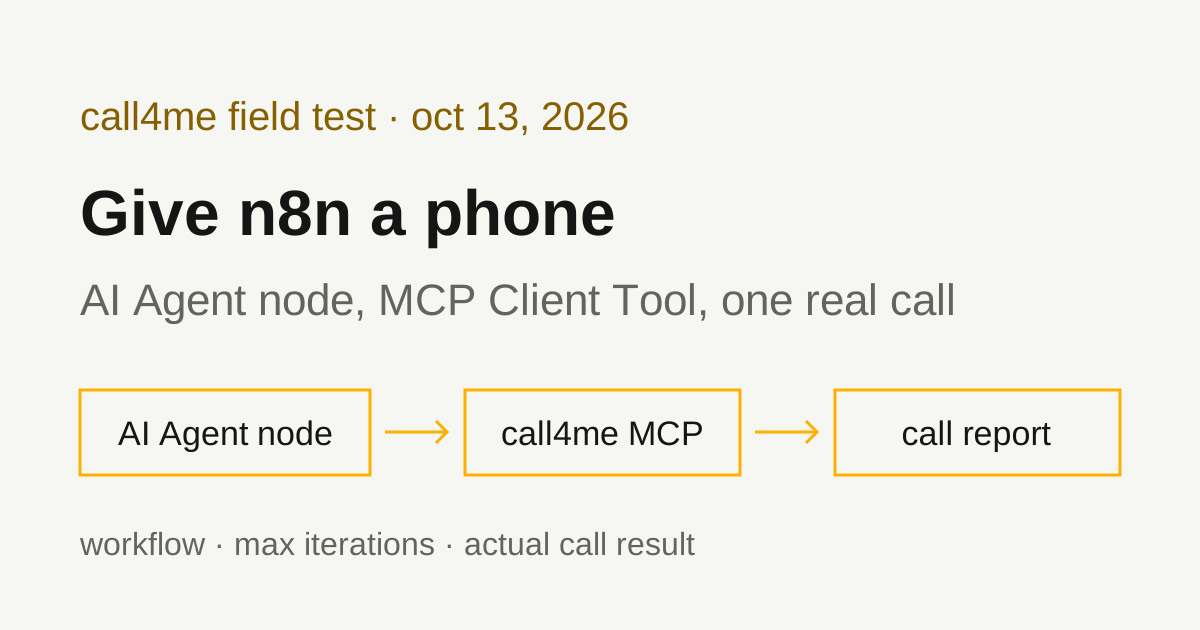
n8n can make phone calls through an MCP server. Add an AI Agent node, attach a chat model, and attach the MCP Client Tool node to its Tools input with the endpoint https://call4.me/mcp. The agent gets call4me's calling tools: it places the call, follows it until it ends, and reports what happened. A voice caller handles the conversation. n8n reads the status and transcript through tools.
We tested this with n8n 2.43.4 on October 13, 2026, running the official Docker image on Linux. The workflow checked the account balance, then placed one real call to Xfinity customer service. It reached a live representative in 2 minutes 40 seconds. The representative declined to answer general questions, and the agent reported that honestly.
What you need
- An n8n instance. We self-hosted it with Docker and didn't test n8n Cloud.
- A chat model credential. We used OpenAI with
gpt-5.1. - A call4me account with calling credits, and your API key from the account page.
Run n8n locally
n8n's Docker install page documents:
docker volume create n8n_data
docker run -it --rm \
  --name n8n \
  -p 5678:5678 \
  -e GENERIC_TIMEZONE="<YOUR_TIMEZONE>" \
  -e TZ="<YOUR_TIMEZONE>" \
  -e N8N_ENFORCE_SETTINGS_FILE_PERMISSIONS=true \
  -v n8n_data:/home/node/.n8n \
  n8nio/n8n
That page now carries an outdated-content notice and points to the Docker Compose guide. The command still worked. We ran the same image detached, pinned to the version we tested, with a throwaway volume and the port bound to localhost:
docker volume create n8n_call4me_scratch
docker run -d --name n8n-call4me \
  -p 127.0.0.1:5678:5678 \
  -e GENERIC_TIMEZONE="America/New_York" -e TZ="America/New_York" \
  -e N8N_ENFORCE_SETTINGS_FILE_PERMISSIONS=true \
  -v n8n_call4me_scratch:/home/node/.n8n \
  n8nio/n8n:2.43.4
n8n --version inside the container printed 2.43.4. n8n's npm page also documents npx n8n with Node.js 20.19 through 24.x, and says npm-based installs are deprecated from n8n 3.0. We didn't test the npm path.
Open http://localhost:5678 and create the owner account. We did that step through n8n's REST endpoint instead of the browser, since this test ran on a headless machine.
Build the workflow in the editor
The workflow is four nodes:
- A trigger. We used Manual Trigger. The agent's prompt source can also be a connected Chat Trigger, which we didn't test.
- AI Agent, with Source for Prompt set to Define below and your brief in the prompt field.
- OpenAI Chat Model on the agent's Chat Model input.
- MCP Client Tool on the agent's Tool input.
Set the MCP Client Tool like this:
| Field | Value |
|---|---|
| Endpoint | https://call4.me/mcp |
| Server Transport | HTTP Streamable |
| Authentication | Bearer Auth |
| Credential | A new Bearer Auth credential with your call4me API key as the token |
| Tools to Include | All, or Selected if you want to limit what the agent can do |
The docs page for this node is behind the node. n8n's MCP Client Tool page still describes an "SSE Endpoint" field. In 2.43.4, new nodes default to version 1.4, which has Endpoint and Server Transport, with HTTP Streamable as the default and Server Sent Events (Deprecated) as the other option. We read that from the node's source in the image we ran. Pick HTTP Streamable for call4me.
The Authentication menu in 2.43.4 offers Bearer Auth, Header Auth, MCP OAuth2, Multiple Headers Auth and None. The node also has a Timeout option, 60000 ms by default, for how long a single tool call may take. call4me's status checks wait at most 50 seconds, so the default is enough.
We built our workflow from JSON rather than clicking through the editor, so the labels above come from n8n's node definitions and docs, not screenshots. Here is the MCP node from the workflow we imported:
{
  "name": "call4me",
  "type": "@n8n/n8n-nodes-langchain.mcpClientTool",
  "typeVersion": 1.4,
  "parameters": {
    "endpointUrl": "https://call4.me/mcp",
    "serverTransport": "httpStreamable",
    "authentication": "bearerAuth",
    "include": "all",
    "options": {}
  },
  "credentials": {
    "httpBearerAuth": { "id": "<your credential id>", "name": "call4me API key" }
  }
}
The agent node was @n8n/n8n-nodes-langchain.agent version 3.1 and the model node @n8n/n8n-nodes-langchain.lmChatOpenAi version 1.3, with the model set by ID to gpt-5.1.
What we ran instead of clicking
We created the two credentials with n8n import:credentials (an httpBearerAuth credential with the key in data.token, and an openAiApi credential), from a file we deleted right after. Then we imported each workflow and ran it from the CLI:
docker exec n8n-call4me n8n import:workflow --input=/tmp/wf.json
docker exec -e N8N_RUNNERS_BROKER_PORT=5690 n8n-call4me n8n execute --id=<workflow id> --rawOutput
The port override is there because n8n execute inside a running container failed at first with "n8n Task Broker's port 5679 is already in use." The CLI run starts its own task broker, and the server already holds the default port. This only affects CLI runs next to a running server.
Keep the key in the credential, never in the prompt. Anyone who can run the workflow can place calls billed to your balance.
Sign in with OAuth instead (documented, not tested by us)
call4me also supports browser OAuth sign in with dynamic client registration. n8n's MCP credential page says that with Use Dynamic Client Registration on, which is the default, "n8n automatically registers itself as an OAuth2 client with the MCP server," and that a Resource URL can be left empty for n8n to discover. Choose MCP OAuth2 in the node's Authentication menu to use it. Our test ran headless, so we used a bearer token and did not test this path.
n8n's MCP servers page also describes a registry you connect "in one click" from the agent's tools panel, and says to use the MCP Client Tool for any server that isn't listed. We didn't check whether call4me is in that registry; the MCP Client Tool works either way.
Check the connection before dialing
Our first workflow had this prompt:
Use the call4me_get_balance tool to check my phone calling connection. Show my balance and call4me numbers. Do not place a call.
The agent made one tool call and answered from the live result with the balance, the per-minute rate and the account's numbers. No call was placed.
Tool names get a prefix. n8n names each MCP tool after the node it comes from, so with our node named call4me, the agent saw call4me_call4me_get_balance, call4me_call4me_place_call and so on. The prompt still used the plain names and the model matched them. If you rename the node, the prefix changes with it.
Long calls and Max Iterations
call4me_place_call returns as soon as the call is dialed. The agent then calls call4me_get_call with wait_seconds over and over until the call ends. In n8n, each of those rounds counts against the AI Agent node's Max Iterations option. n8n's Tools Agent page says it "Defaults to 10." When the limit is hit, the node stops with "Max iterations (10) reached. The agent could not complete the task within the allowed number of iterations." The call itself keeps going; only the agent stops watching it.
Our Xfinity run used nine tool rounds: two placement attempts and seven status checks at 30 seconds each, for a call billed at 4 minutes. That is one short of the default. A call with a longer hold would have hit it. We set Max Iterations to 40 under the agent's Options before running, and the whole call fit in one execution of about four and a half minutes.
For calls that may sit on hold:
- Raise Max Iterations. Each status check at
wait_seconds30 covers about half a minute, so 40 rounds covers roughly 20 minutes of call. - Ask for
wait_seconds50, the maximum, so each round covers more time. It stays under the MCP node's 60 second timeout. - For very long holds, let the agent place the call and return the call ID, then follow it with a separate workflow on a schedule.
Set max_minutes on the call too. It caps billed time, including hold.
Give the agent a bounded calling task
This is the prompt we put in the AI Agent node for Xfinity, with our callback number removed:
Use call4me to make one informational phone call to Xfinity customer service at 1-800-934-6489 (the residential number on xfinity.com/support/articles/rights).
This is research for a consumer guide on reaching Xfinity customer service. It is a general inquiry, not about any account.
Questions for the representative:
- What's the best way through the phone menu to reach a live person for billing questions?
- What hours are agents available, and in what time zone?
- How does the callback option work?
- How long does a billing credit usually take to post?
Menu route that reached a person before: when the voice assistant asks, say this is about internet service, then choose "something else", then say "billing". Do not press 1 for text chat; press 2 or wait to stay on the phone.
Limits: category "general" with these questions in details.questions, max_minutes 240, timezone America/New_York. The caller must say it is a general inquiry for a consumer guide, never claim to be a customer, never give an account number, phone number on an account, PIN, card, address or personal details, and never agree to any change or purchase. If the menu asks for an account phone number or address, say there isn't one and ask for a representative. Decline any callback and stay on hold. The only callback number it may give is [your callback number] (put that in facts).
After placing it, follow the call with call4me_get_call (wait_seconds 30) until it ends. If an open question appears, answer only from this brief; otherwise say it is unknown. Then report the call ID, whether a live person was reached, how long it took to reach them, and the answers to each question. Do not place any other call.
"Do not place any other call" matters in an unattended workflow. Nothing else stops a second dial.
The tools n8n used
| Tool | What the agent did with it |
|---|---|
call4me_get_balance |
Read the balance and numbers in the connection check |
call4me_place_call |
Placed the call. The first attempt was rejected before dialing; the second dialed and returned a call ID |
call4me_get_call |
Followed the call seven times with wait_seconds: 30 until it completed |
call4me_get_requirements |
Not used. The agent went straight to placing the call, which worked because the brief already listed the questions |
call4me_answer_question |
Not needed. No question came up mid-call |
The first call4me_place_call was rejected with "goal: Too big: expected string to have <=1500 characters." The agent had pasted most of the brief into the call's goal. call4me checks its inputs before dialing, so nothing was dialed. The agent shortened the goal and tried again, and only one call went out. The MCP page has call4me's full tool list.
What the Xfinity call got
From the call record and the recording:
- Xfinity's system answered with a promo and a Spanish option. The caller said "English."
- The system looked up the calling number. It said it had a street address on file for that number and asked the caller to say no or press 2 if that wasn't the account. The caller didn't respond and the system moved on. If you call from a number on someone else's Xfinity account, expect this.
- The virtual voice assistant asked how it could help. The caller said "Internet service," then "Something else," then "Billing."
- The system offered text chat: "Press 1 to connect with an agent via text messaging on your mobile device. Otherwise, press 2." The caller didn't press 1, and the system said "Please wait for the next available representative."
- A live representative answered 2 minutes 40 seconds into the recording, about 7 seconds after that hold message.
- The representative asked for a name. The caller said it was an assistant calling with general questions for a consumer guide, not about an account. The representative said "I can't assist" and "I'm not able to assist you." The caller thanked them and ended the call.
call4me returned the outcome as partial: the menu route worked and a person answered, but none of the four questions were answered. Billed time was 4 minutes, $1.00.
What n8n's agent reported. It said a live agent was reached, gave the menu route step by step, and marked hours, callbacks and credit timing as unknown because the representative declined. It added that no callback option was offered on this call, which matches the transcript. It didn't fill any answer in from its own knowledge.
One miss. The agent's summary gave the time to reach a person as "about 4 minutes total." That is the billed time. The recording shows 2:40. The transcript call4me_get_call returns has no timestamps, so if timing matters, measure it from the recording.
The route from our earlier Xfinity call still worked: internet, "something else," "billing," and skip the text chat. Hours, callbacks and credit timing from a representative who did answer are in our Xfinity customer service number guide.
Troubleshooting
"Max iterations (10) reached." The agent ran out of rounds while following a call. Raise Max Iterations in the AI Agent node's options, or raise wait_seconds. Check the call ID with call4me_get_call before dialing again: the call may still be running.
"n8n Task Broker's port 5679 is already in use." You ran n8n execute next to a running n8n server. Set N8N_RUNNERS_BROKER_PORT to a free port for that command, or run the workflow from the editor.
The agent can't find call4me_get_call. The tool is named after the MCP node, such as call4me_call4me_get_call. Most models match the plain name. If yours doesn't, use the prefixed names in your prompt.
The node shows an "SSE Endpoint" field. You have an old MCP Client Tool node (version 1). Add a fresh one to get the Endpoint and Server Transport fields, and pick HTTP Streamable.
"Too big: expected string to have <=1500 characters." The call's goal was too long and nothing was dialed. A good agent retries with a shorter goal, as ours did. Keep the questions in details.questions and the goal short.
Authentication errors. Re-create the Bearer Auth credential with a fresh key from the account page. Don't paste the key into the prompt as a fix.
The representative won't answer general questions. That's the outcome, not a setup problem. Have the agent report it, as ours did.
Related guides
For the same workflow in code, see the LangChain MCP guide. For coding agents, see GitHub Copilot phone calls, Codex phone calls and Claude Code phone calls. To compare calling services and setups for other AI apps, read our phone calling MCP comparison. Connection details for every client are on the call4me MCP page.