Schedule phone calls from Claude Code or Codex for tomorrow
Give your agent the full brief now, let call4me keep the schedule, and retrieve the result in a later session. Here are the exact tools, time formats, and live pending and canceled records we checked.
 Nick Khami · · 9 min read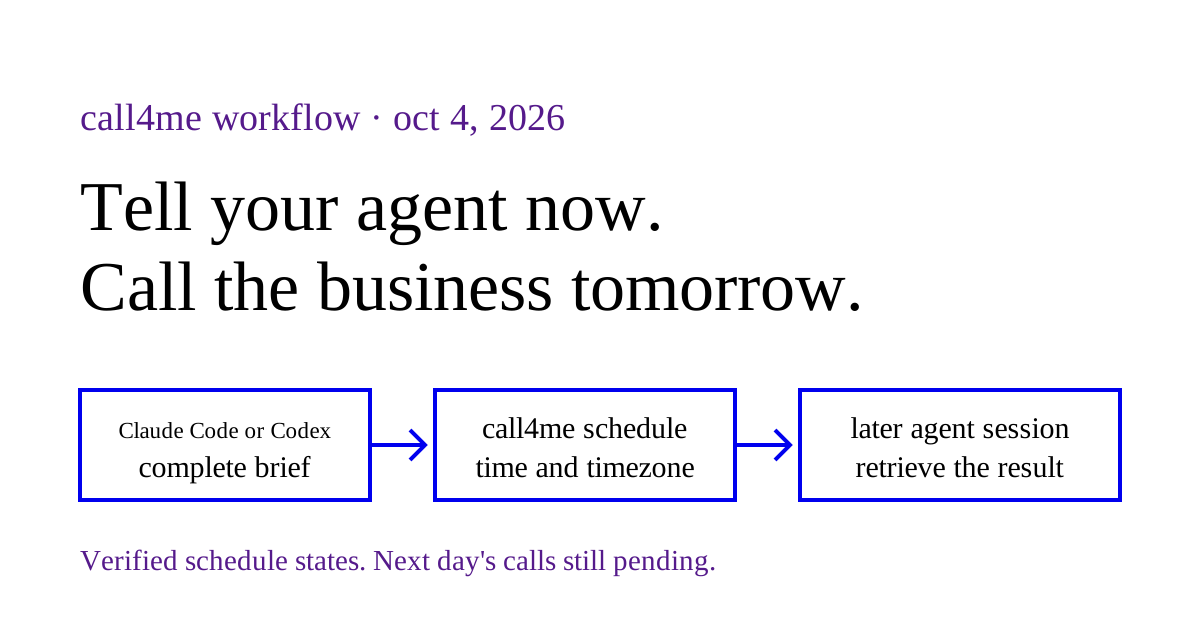
You can schedule a phone call from Claude Code or Codex through call4me's MCP server. Your agent sends the destination, complete calling brief, and an absolute time. Call4me stores the schedule and its server handles the later dial. You can close the agent session and check the same schedule from another session connected to your call4me account.
On October 4, 2026, we checked real production schedules for the next day through a fresh authenticated MCP client. We verified pending records, local time conversion, a canceled record, and a replacement schedule. Those calls had not run when we checked. This article demonstrates scheduling and retrieval, not a completed unattended call or a new scheduling test inside either harness.
Connect the agent you already use #
You need a call4me account, an authenticated MCP connection, and enough calling credits when the call actually starts.
For Claude Code:
claude mcp add --scope user --transport http call4me https://call4.me/mcp
Open Claude Code, run /mcp, choose call4me, and authenticate. The command uses the remote HTTP transport and user scope documented in Claude Code's MCP reference.
For Codex:
codex mcp add call4me --url https://call4.me/mcp
codex mcp login call4me
Complete browser sign in, start a fresh session, and inspect /mcp. OpenAI documents remote HTTP connections, OAuth login, and active server inspection in its MCP reference.
Ask your agent to run call4me_get_balance before scheduling. That checks the account connection and the credits available now. It does not reserve credits for tomorrow.
Our Claude Code calling guide and Codex calling guide describe the actual harness tests, alternate credential setup, and approval behavior. The scheduling workflow below uses the same server and account.
Ask for an exact time and a complete brief #
“Call tomorrow morning” leaves two questions open: whose tomorrow, and which morning hour? Have the agent resolve both before submitting a schedule.
Schedule one call to the business we have been researching, using the number on its official website. Call tomorrow at 9:15 AM in the business's local timezone, after checking that its published hours include that time. Before submitting, show me the full calendar date, timezone, and equivalent time where I am. Ask only the unresolved questions in our comparison. This is general research, with no booking, hold, payment, invented event, callback request, or voicemail. Limit the call to four minutes. Put the complete questions and limits into the scheduled brief, and return the schedule ID and confirmed time.
Replace the research limits if your actual task is a reservation or cancellation. Give the caller the dates, identity details, alternatives, and authority that task requires. If a fact is undecided, say so explicitly.
The later voice caller receives the submitted brief, not your entire agent conversation. Put essential facts into details and facts, and permissions or acceptable alternatives into flexibility. A saved goal of “finish what we discussed” is not enough.
Use call4me_get_requirements for the category before scheduling. A general inquiry requires details.questions. Booking categories have different required fields. The scheduling tool checks these requirements while you are still present, so missing information can be resolved before the call is queued.
The exact MCP scheduling input #
call4me_schedule_call takes the same calling brief as call4me_place_call, plus call_at. Call4me's agent reference links its MCP endpoint and published calling skill, which describes scheduling, status checks, and cancellation. This example shows the shape using our real MyEyeDr. general pricing inquiry and its original scheduled time. The date is historical once October 5 passes. Choose your own authorized destination and a future time before using it.
{
  "to": "+12813912020",
  "business": "MyEyeDr. Cinco Ranch",
  "category": "general",
  "goal": "Ask current general uninsured glasses exam pricing and required inclusions. Do not book anything.",
  "details": {
    "questions": "What is the routine glasses exam price? Are refraction, a prescription copy, retinal imaging and dilation included? Which extra fees are required versus optional?"
  },
  "facts": "General editorial pricing research only. We are not a patient and have no appointment to book. Do not share patient or saved personal profile details.",
  "flexibility": "Information only. No booking, payment, callback request, voicemail or connection to the user. One attempt. Hang up when closed or at voicemail. Accept unknown amounts.",
  "max_minutes": 4,
  "timezone": "America/Chicago",
  "call_at": "2026-10-05T09:15:00-05:00"
}
This is a shortened example of the brief, not an instruction to place another call to that office. It asks for general prices, not personal medical advice or patient information.
Two supported time formats #
| Format | Example | Meaning |
|---|---|---|
Local date and time with timezone |
call_at: "2026-10-05T09:15", timezone: "America/Chicago" |
October 5 at 9:15 AM on the business's clock |
| ISO date and time with an explicit offset | call_at: "2026-10-05T09:15:00-05:00" |
The instant specified by that offset |
An explicit offset determines the scheduled instant. The timezone also gives the caller a local context and provides a local display in the schedule response. If you provide both, make sure they agree for the selected date. Do not reuse a summer offset blindly for a winter call.
An offset free call_at without a timezone is rejected. So is a time in the past. Scheduling supports times up to 60 days ahead. Near a daylight saving clock change, choose an unambiguous hour or supply an explicit offset and check the returned UTC time.
Business hours still need research. A valid timestamp does not establish that someone will answer. Check the specific location and department rather than assuming restaurant dinner hours are also the events office's hours.
Save the ID and check what the server accepted #
Scheduling returns an ID beginning with sched_. Have the agent retain it in your task notes alongside the business, submitted date, timezone, questions, and limits. The ID lets a later session inspect the same record.
| Tool | Input or use |
|---|---|
call4me_schedule_call |
Submit the complete brief and call_at |
call4me_get_call |
Pass the schedule ID as call_id to inspect its state |
call4me_list_calls |
Find pending schedules on the authenticated account, followed by recent calls |
call4me_cancel_scheduled_call |
Pass the schedule ID as scheduled_id before it dials |
For a pending schedule, the status check is:
{
  "call_id": "sched_YOUR_SCHEDULE_ID",
  "wait_seconds": 0
}
The placeholder above is not a real ID. Use the value returned by the scheduling tool.
Before dialing, the response contains scheduled.status, scheduled.call_at, scheduled.call_at_local, and a null scheduled.call_id. Compare the returned instant with your intended time. For tomorrow's schedule, one check is enough; repeatedly polling a pending record does not make it run sooner.
What we verified against production #
We created the following editorial research schedules through the authenticated MCP endpoint on October 4, and canceled the original M Hansik schedule when changing its date. We retained those original tool responses. For this article, a fresh client retrieved the records and listed the pending calls without creating, canceling, or changing anything. Dates below are the business's local dates.
| Record | Server state when checked | Local time | Stored UTC time |
|---|---|---|---|
| MyEyeDr. Cinco Ranch general pricing inquiry | pending |
October 5, 9:15 AM Central | 2026-10-05T14:15:00.000Z |
| The Lenny general private dining inquiry | pending |
October 5, 4:15 PM Eastern | 2026-10-05T20:15:00.000Z |
| Original M Hansik inquiry | canceled |
October 7, 5:15 PM Eastern | 2026-10-07T21:15:00.000Z |
| Replacement M Hansik inquiry | pending |
October 5, 5:15 PM Eastern | 2026-10-05T21:15:00.000Z |
The M Hansik replacement also illustrates why hours need an independent check. Its published hours listed Monday as closed. We retained Monday at the user's explicit request, recorded that limitation in the brief, and required the caller to end without leaving a message if closed or at voicemail. A pending record is not evidence of a sensible opening time or successful conversation.
The canceled schedule returned finished: true and call_id: null. That means the schedule is finished without a linked call. It does not mean a business conversation happened.
The saved creation and cancellation responses, together with the fresh reads, verify those earlier actions, persistence, retrieval, and the displayed timezone conversion. They do not yet verify the later dial, staff answers, unattended question handling, or delivery of a completed result back into an agent thread. The result evidence will belong in the eye exam cost article and private dining walkthrough after the calls actually finish.
Change the time without leaving two calls queued #
There is no schedule editing tool in the current MCP interface. To move a pending call:
- Inspect the original schedule with
call4me_get_call. - If it is still pending, cancel it with
call4me_cancel_scheduled_calland itsscheduled_id. - Retrieve the original again and confirm
scheduled.status: "canceled". - Submit the same authorized brief with the new
call_at. - Inspect the replacement ID and confirm the new time.
That is how we moved the M Hansik inquiry above. Creating a second schedule alone does not cancel the first.
If cancellation reports that the schedule is already dialing or placed, inspect it before proceeding. Once a linked call exists, call4me_hang_up acts on that live call ID. Do not assume canceling a schedule will disconnect a call that already started.
Retrieve the result in a later session #
In a new Claude Code or Codex session connected to the same account, ask:
Check this call4me schedule ID. If it is pending, report its confirmed time. If it has dialed, follow the linked call and return the outcome, transcript, unanswered questions, and available recording. Separate a person's answer from a menu or voicemail. If it failed, show the error and do not retry or create another call without my instruction.
call4me_get_call accepts the original schedule ID after dialing too. It resolves the linked call and returns its call information together with the schedule. A schedule state of placed means a call was submitted; read the call's own status and outcome to find out what happened.
Use wait_seconds: 30 when following a call that is actively running. Once it ends, use the linked call_ ID with call4me_get_recordings to retrieve any available recordings. A missing or pending recording is not evidence that a conversation succeeded.
What can go wrong while you are away #
Credits are held when dialing, not when scheduling. Another call can consume tomorrow's budget. Check the balance beforehand and inspect failures rather than assuming a successfully saved schedule guarantees placement.
A business may ask a question outside the brief. Provide required facts and clear acceptable alternatives up front. Call4me can expose open questions while a call runs, but a closed Claude Code or Codex session cannot answer them. The documented scheduling behavior warns that an unanswered question can end with the caller saying the user will call back. Do not promise that statement as a future action you have already authorized.
A stored schedule does not subscribe your original thread to a notification. The workflow demonstrated here retrieves the record explicitly. We have not verified an automatic notification or a result appearing in a closed harness session.
Calls needing an account PIN cannot be scheduled. Call4me rejects scheduled intake requiring a sensitive PIN because it does not retain one for later. Use a live workflow when that verification is necessary.
A tool timeout leaves the result uncertain. Inspect call4me_list_calls before submitting the same schedule again. If you have the ID, retrieve that record. Creating another schedule can cause a duplicate call.
Scheduling is useful when the agent finishes its online research before a business opens. Give it a complete brief, verify the accepted time, save the ID, and bring the actual phone evidence into the next session.